mp3Tag Pro
trusted
DOWNLOAD
3.2 MB
The aggregate score based on the app's rating, number of users, and a number of other parameters closely linked to user satisfaction.
The best possible score is 10.
2.5
Video tutorial & screenshots
Editorial review
Comments
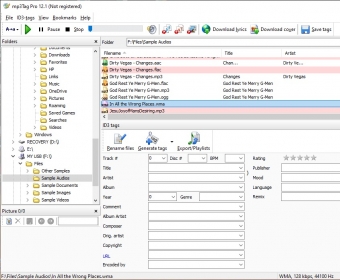
mp3Tag Pro is a highly flexible and versatile utility that offers you a plethora of features and functions to help you add, edit, and export music tags. Despite its name, the program supports many other file formats apart from MP3, such as Ogg, WMA, FLAC, M4A, MP4, AAC, and APE. Besides, it comes with a comprehensive file renamer for you to organize your entire music collection quickly and efficiently.
Tag editing can be done either manually or by importing the required tags from different sources. When you select an audio file, mp3Tag Pro will show you whatever tags are already present in the file. In the program’s main interface you can add, delete, or modify any of the provided tags manually, or you can click on the “Generate tags” button to move to the program’s automated tagging processes. To bulk-generate new tags or to replace existing ones, you can either make use of the information already stored in file and folder names, or import the necessary tags from existing music databases, such as Discogs, MusicBrainz, FreeDB, or even Amazon. Besides, the program offers you an extensive list of options for you to customize your tags and automate the tagging process to the smallest detail.
File renaming is also a flexible and simple process – you can select any combination of tags to create templates that the program will then use to rename your music collection. As a bonus, the program offers you the possibility of adding lyrics to your music files. These can be imported from a text file or typed in directly using the panel provided in the program’s main window.
mp3Tag Pro is a serious option for anyone needing to tag and organize their music collection in an easy and rewarding way. A more intuitive design of its interface, however, would help novice and inexperienced users to feel more confident about it.
Pros
- Supports not only MP3 files, but also some of the most popular audio formats.
- Playlist support.
- Connects to FreeDB, Amazon, Discogs, and MusicBrainz looking for tags.
- ID3v1 and ID3v2 tag support.
Cons
- The program's interface may be hard to navigate for novice users.
What's new in version 8.0
Of course, the main change is the full Unicode support. This includes filenames, folder names, and ID3 tags. If you are a music lover, this is a "must have"!
mp3Tag Pro comes with some major interface changes. Now the main tag fields are displayed in the list next to filenames. It is now possible to apply filters and quickly select songs without tags, lyrics, or cover art. Additionally, we greatly improved the lyrics search feature, the old engine is now complemented with scripts.
What's new in version 7.3
View and edit ID3 tags.
ID3v1, ID3v2, Lyrics3 are supported in MP3 files.
Extract parts of filenames and folder names to ID3 tags.
Download ID3 tags from Amazon.
Download ID3 tags from FreeDB.
Download ID3 tags from Discogs.
Download ID3 tags from MusicBrainz.
Import tags from a CSV file.
Export tags to MS Excel, CSV, TSV.
Auto-fill track number for a group of audio files.
Process multiple files and folders at once.
Rename audio files using information from ID3 tags.
Create a folder hierarchy and sort your music collection.
Download lyrics.
Save lyrics inside music files or as separate files.
Publisher's description
Music files can contain plenty of useful information that helps organize and identify them: artist, title, album, year, comments, track number, lyrics, album art, and so on. Such information is stored inside music files themselves and thus cannot be lost when files are moved or backed up, which is very convenient. Furthermore, the information is used by software and hardware players to organize music collection, to search for a specific song etc. It also looks nice if a portable player shows cover art, lyrics and other related information when playing the song.
mp3Tag Pro is a tool that makes editing and manipulating such information easy as pie. It can download missing tags from the internet, extract tags from parts of filenames and folder names, import tags from a text file, export tags and playlists, and so on. It is also good at renaming music files and organizing them into newly created folders.
One of the most popular music formats is MP3. There are two main versions of MP3 tags: ID3v1 and ID3v2. mp3Tag Pro can easily manage both versions, copy information from one to the other, batch-process MP3 tags, download MP3 tags from the internet, create MP3 playlists. On the other hand, it is also a powerful MP3 renamer. The program can take any field from MP3 tag and use it to build new filenames. Fields of MP3 tags can be used in any succession to rename MP3 files and to create new folders.
In just the same way, parts of filenames and folder names can be used to fill out empty or incorrect fields of MP3 tags. For example, imagine that you have a bunch of MP3 files with almost correct information in the fields. However, track number is absent. At the same time, filenames contain track numbers, so the only question is how to copy this information to the corresponding tag field.
With mp3Tag Pro you can fill out missing tag fields in a few seconds!
Leave a comment
All comments (0)